Know which PG rooms and beds are occupied or vacant
When room details live in a register or spreadsheet, it can take extra time to check availability or find a tenant’s current room. PGMaaya helps PG owners organise room and bed records and review occupancy from one place.
Set up rooms and beds in batches
Room setup starts with the details you use to manage a property: a room number, floor when relevant, how many people the room can accommodate, and rent per bed. Add rooms in bulk rather than repeating the same setup one room at a time.
- Group rooms by property so each PG has its own room map.
- Record bed capacity and review occupancy at the bed level.
- See which beds are occupied and which are vacant.
- Keep room, tenant, and rent information connected for day-to-day checks.
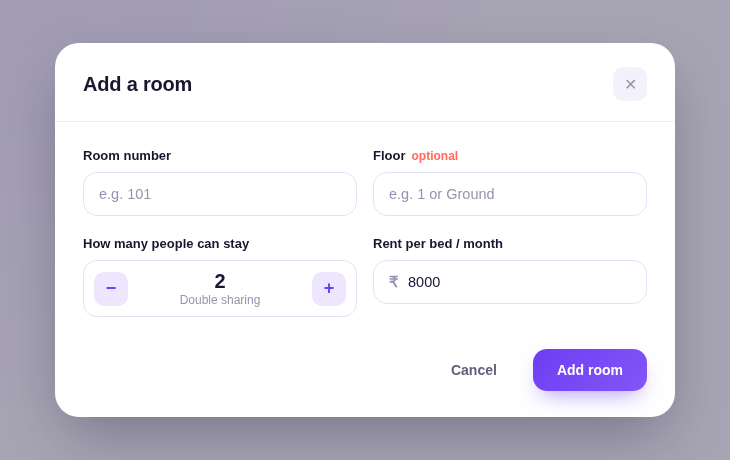
From property setup to an occupancy check
- Choose the property. Keep room records with the PG they belong to when managing more than one property.
- Add rooms. Create room records in bulk, then record the capacity and rent details used for that room.
- Review availability. Use the room and bed view to check occupied and vacant spaces before following up with your team or a prospective resident.
- Keep resident details connected. Use the tenant record and room assignment together as residents move in or out.
A clearer view of availability
Room and bed records make it easier to answer practical questions: which room has a vacant bed, how many beds are occupied, and which tenant is assigned to a room. Availability is a management view for your team; PGMaaya is not a public room-booking marketplace.
Room details and workflows can vary by property. Contact the PGMaaya team for a walkthrough of the current product and to confirm what fits your setup.
Book a free walkthroughPG room management FAQs
Can I create multiple room records at once?
Yes. PGMaaya supports bulk room creation, so you can set up many rooms in one action instead of adding each record individually.
Can I track beds as well as rooms?
Yes. Room records include bed capacity, letting you review occupancy and vacant beds within a room.
Can I manage rooms for more than one PG?
Yes. You can manage multiple PG properties from one account while keeping each property's room map and records separate.
Does PGMaaya let tenants book rooms online?
PGMaaya is a property-management tool, not a public room-booking marketplace. Contact the team to confirm the current room-management workflow.